Instructions for Chairs and Presenters
Notice to Session Chairs, Speakers, and Facilitators
We recognize that some individuals assigned roles at JSME58 may be affected by the recent earthquake, including through disaster impacts, evacuation, or disaster response responsibilities.
If you anticipate difficulty attending the meeting or fulfilling your assigned role, please contact the JSME58 Organizing Committee whenever reasonably possible.
Please be assured that the meeting has been designed to accommodate such circumstances. Many sessions are chaired by two individuals, and alternative arrangements can be made when necessary. If you are unable to contact us due to disaster-related circumstances, please do not feel obligated to do so.
We respectfully ask that you prioritize your own safety, the safety of your family members, and any disaster response responsibilities you may have.
The 58th Annual Meeting of the Japan Society for Medical Education (JSME58)
Congress President: Akiteru Takamura
JSME58 Organizing Committee
For Oral Presenters
1. PC Preview
Please register and preview your data at the PC Center at least 30 minutes before your presentation.
Please use the PC Center at the venue where your presentation will take place. Presentation data cannot be accepted at the PC Center of any other venue.
<PC Center Opening Hours and Location>
| Location | July 31st (Friday) |
Saturday, August 1st |
August 2nd (Sunday) |
|---|---|---|---|
| Toyama International Conference Center 2F Foyer | 8:30-17:30 | 8:15-17:30 | 8:15-12:30 |
| Toyama Shimin Plaza 4F Foyer | 8:30-17:30 | 8:15-17:30 | 8:15-12:30 |
| ANA Crowne Plaza Hotel Toyama 3F Foyer | 8:30-17:30 | 8:00-17:30 | 8:00-11:00 |
- Please note that registration of presenters in the morning program will be given priority until 9:00 on both days.
Although preview can be available at the PC center, corrections are not acceptable. - Displays, keyboards and mouses are provided on the podium.
As the first slide will be projected by the secretariat, please operate from the second slide by yourself.
2. Preparing Presentation Data
[If you bring your own media]
1) How to bring presentation data
- Please create your presentation data in “Microsoft PowerPoint” and save it in a USB flash drive and bring them.
- When copying your presentation data to media, be sure to finalize the data (close the session and save it on the USB you used). If the data is not finalized, it will not open on other PCs.
- If your presentation data includes movie/video, please bring your own laptop in case of any troubles.
2) Presentation data creating environmenta
- The following OS and applications are available at the PC center.
OS: Windows 11
Application: PowerPoint365
If you create your data on Macintosh, please bring your own laptop and output adapter.
<Data creating environment>
| Application | MS Windows PowerPoint 2024 |
|---|---|
| Font | Arial, Arial Black, Century, Century Gothic, Times New Roman |
| Symbol notation (recommended) | Symbol, etc. |
Using standard fonts in Windows is recommended.
3) The resolution of the LCD projector is Full HD (1920 x 1080 pixels). The recommended slide size is widescreen (16:9 ratio).
4) If your presentation data is linked to movie/video, those linked files should also be saved in the same folder.
Please confirm the operation on another PC that was not used for data creation.
Windows: Windows Media Player
* Note
Ensure your video file can be played using the codecs included in the default settings of Windows 10 and Windows Media Player 12 (MP4 format recommended).
Audio output is also possible.
5) Be sure to test and review all the presentation slides in advance to ensure that they work properly.
6) Do not select “Use Presenter View” of slideshow tab in PowerPoint.
7) All presentation data will be disregarded as soon as possible after the conference.
[If you bring your own laptop]
- Operation Confirmation: Confirm the operation of the presentation data on another PC that was not used for data creation. There is no guarantee of operation in Non-Windows PC, iPad, Surface GO, and other tablet devices. Use them at your own risk.
- AC Adapter: Please be sure to bring your own AC adapter.
- Settings: Deactivate screensaver and power-saving mode in advance. If not deactivated, the mode will be changed at the PC center.
- Backup Data: Please bring backup data for your presentation.
- Laptop Drop-off: After PC preview check, please bring your laptop to the operator’s desk at the front left of the session room at least 20 minutes before your presentation. It will be returned at the desk after the presentation.
- Connector: The secretariat will prepare an HDMI cable connector for PC. If your laptop needs a connector to convert to HDMI, please bring your own cable.
3. Presentation time
All presenters must start and finish punctually as scheduled to ensure sessions proceed smoothly.
Invited lecture: Presentation time differs depending on each program. Allocation time for each appointed speaker will be notified by the secretariat.
Outstanding Research Award: 15 min. (Presentation 10min. / Q&A 5 min.)
Young Investigator Award: 11 min. (Presentation 8 min. / Q&A 3 min.)
Student Award: 7 min. (Presentation 5 min. / Q&A 2 min.)
Oral presentation: 10 min. (Presentation 6 min. / Q&A 4 min.)
For Poster Presenters
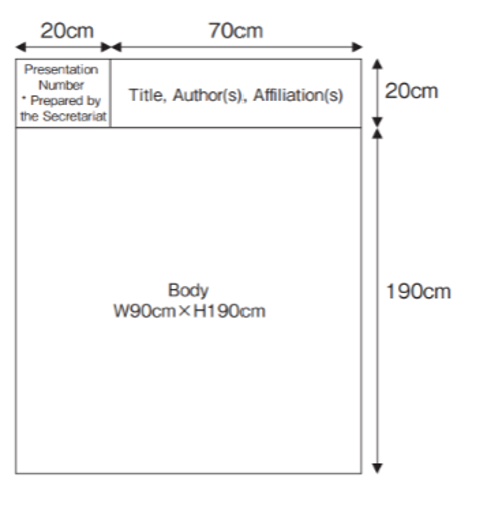
The poster panel size is 210 cm in height and 90 cm in width (see the figure on the right). Please prepare the poster title, authors' names, and affiliations yourself.
The presentation number (to be displayed in the upper left corner of the panel) and pushpins for mounting your poster will be provided by the Secretariat.
Outstanding Research Award(ORA) and Young Investigator Award (YIA) ,Student Award (SA)
Outstanding Research Award and the Young Investigator Award, Student Award: Award winners including best Awardee of each session will be recognized at the end of ORA/YIA/SA sessions. Please note that all ORA and YIA, SA presenters are requested to stay until the end of the session, as there will be an award ceremony

![Poster Download [PDF]](../images/thum_poster_download.jpg)